
Game Development journey
Beginner "how to" tutorials , programming, software usage, artwork, news and more

While I was working on my Stopwatch Android app I had to build several functions that would use time the app was counting as an argument and return some values I needed, and which were time dependent. Well it's a stopwatch, so almost everything depends on time passed.
The app has analog style display with arrows, digits, milliseconds scale, etc... But I also wanted to show days, hours, minutes, seconds and milliseconds with digits. Because you know... Believe or not but analog display might be confusing for some, people say 🙂
I used Label Node to show that data. If there's change in the time value Label's text property gets updated every frame as well as the rotation of arrows.
As displaying plain seconds (12 456.594 seconds make me wanna use calculator) wouldn't do the job, I wrote several functions to get an array with 5 values out of any number of seconds given. I named it time_extract()
'DHMS.s' is something I've just made up to simplify this writing. Anyway, the logic is quite straightforward:
time_extract(arg) receives float seconds as an argument#========TIME EXTRACTION========
func time_extract(my_time):
var days = 0
var hours = 0
var minutes = 0
var seconds = 0
var mill_seconds = 0
var time_array = [days, hours, minutes, seconds, mill_seconds]if...elif the argument (time) gets evaluated to find out in what range it happens to be and therefore which array members have to get new valuesif... elif blocks depends on the time argument: if my_time < 1: # less than a second
mill_seconds = get_mill_seconds(my_time)
elif int(my_time) in range(1, 60): # less than a minute
mill_seconds = get_mill_seconds(my_time)
seconds = get_seconds(my_time)
elif int(my_time) in range(60, 3600): # less than an hour
mill_seconds = get_mill_seconds(my_time)
seconds = get_seconds(my_time)
minutes = get_minutes(my_time)
elif int(my_time) in range(3600, 86400): # less than a day
mill_seconds = get_mill_seconds(my_time)
seconds = get_seconds(my_time)
minutes = get_minutes(my_time)
hours = get_hours(my_time)
elif int(my_time) >= 86400: # more than one day
mill_seconds = get_mill_seconds(my_time)
seconds = get_seconds(my_time)
minutes = get_minutes(my_time)
hours = get_hours(my_time)
days = get_days(my_time)if... elif block, then a member gets a new value: time_array[0] = days
time_array[1] = hours
time_array[2] = minutes
time_array[3] = seconds
time_array[4] = mill_seconds
for i in range(time_array.size()):
if time_array[i] < 10:
time_array[i] = "0" + str(time_array[i])
else:
time_array[i] = str(time_array[i])
return time_arrayThe for loop above converts array members into strings and keeps them consistent, with 2 digits adding "0" before numbers less than 10. Finally, I return my time array for farther use.
Here's 5 helper functions - each gets data for every array member if there's data to get. For example, if the number of seconds equals to or exceeds 24 or more hours get_days() function is called and it returns a value which is then assigned to days variable. These helpers also use time for calculations:
func get_mill_seconds(t):
return int((t - floor(t)) * 100)
func get_seconds(t):
t = floor(t)
var mnts = floor(t/60)
return t - (mnts * 60)
func get_minutes(t):
t = floor(t)
var hrs = floor(t/3600)
return floor((t - (hrs * 3600))/60)
func get_hours(t):
t = floor(t)
var dys = floor(t/86400)
return floor((t - (dys * 86400))/3600)
func get_days(t):
return floor(t/86400)
#========TIME EXTRACTION END========The overall script looks like this:
#========TIME EXTRACTION========
func time_extract(my_time):
	var days = 0
	var hours = 0
	var minutes = 0
	var seconds = 0
	var mill_seconds = 0

	var time_array = [days, hours, minutes, seconds, mill_seconds]
	if my_time < 1: # less than a second
		mill_seconds = get_mill_seconds(my_time)
	elif int(my_time) in range(1, 60): # less than a minute
		mill_seconds = get_mill_seconds(my_time)
		seconds = get_seconds(my_time)
	elif int(my_time) in range(60, 3600): # less than an hour
		mill_seconds = get_mill_seconds(my_time)
		seconds = get_seconds(my_time)
		minutes = get_minutes(my_time)
	elif int(my_time) in range(3600, 86400): # less than a day
		mill_seconds = get_mill_seconds(my_time)
		seconds = get_seconds(my_time)
		minutes = get_minutes(my_time)
		hours = get_hours(my_time)
	elif int(my_time) >= 86400: # more than one day
		mill_seconds = get_mill_seconds(my_time)
		seconds = get_seconds(my_time)
		minutes = get_minutes(my_time)
		hours = get_hours(my_time)
		days = get_days(my_time)
	time_array[0] = days
	time_array[1] = hours
	time_array[2] = minutes
	time_array[3] = seconds
	time_array[4] = mill_seconds

	for i in range(time_array.size()):
		if time_array[i] < 10:
			time_array[i] = "0" + str(time_array[i])
		else:
			time_array[i] = str(time_array[i])

	return time_array
func get_mill_seconds(t):
	return int((t - floor(t)) * 100)

func get_seconds(t):
	t = floor(t)
	var mnts = floor(t/60)
	return t - (mnts * 60)

func get_minutes(t):
	t = floor(t)
	var hrs = floor(t/3600)
	return floor((t - (hrs * 3600))/60)

func get_hours(t):
	t = floor(t)
	var dys = floor(t/86400)
	return floor((t - (dys * 86400))/3600)

func get_days(t):
	return floor(t/86400)
#========TIME EXTRACTION END========After making the function to do exactly what I needed I also had to code looping through that returned array to line up all its members into one string with spaces and a dot just before the milliseconds. Here it is:
func tablo_output(source):
	var result = ""
	for i in range (source.size()):
		if i == source.size() - 1:
			result += "." + source[i]
		elif i == source.size() - 2:
			result += source[i]
		else:
			result += source[i] + " " + ""
	return result
This loop makes a one line string out of any array of strings. It separates the members with spaces but if they are the last two - with the dot.
The string is assigned to Label Node's text property and there you go - after some theme customization the final result is this:
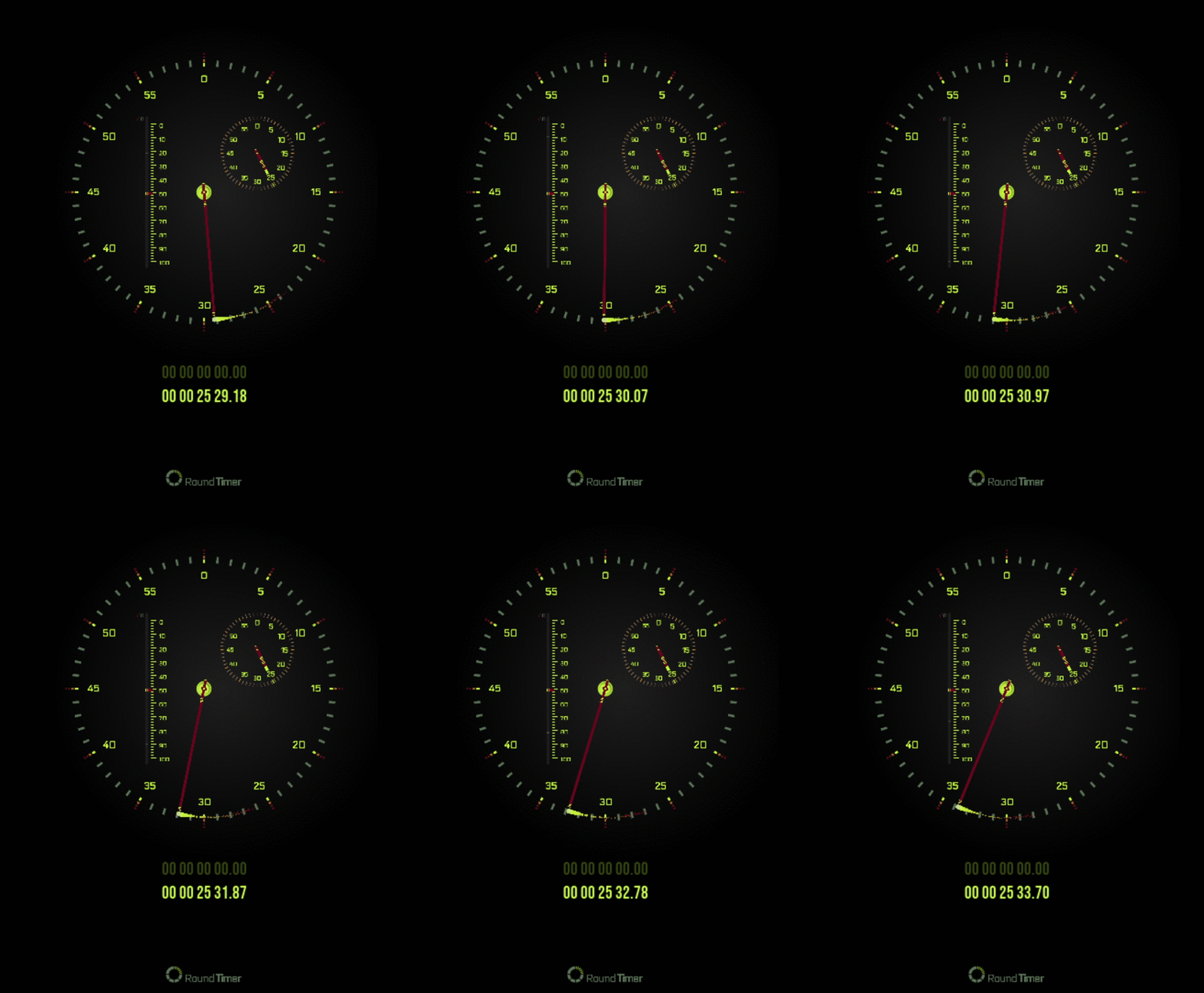
By the way, that glowing trail on the top of the seconds arrow is a Particles2D Node. I used a PNG image of white circle as a texture and 'played' with colors and curves of the flow to make what I wanted out it. You can check out this article to learn how to make exhaust and random explosions with the Particles Generator.
If you find this article useful, follow me on Instagram for more tips and learning materials.


